Mouse Input
Blessed supports mouse input in the terminal! Your applications can respond to clicks, drags, scroll wheel, or track live mouse cursor movement, even at the pixel-level, for creating interactive games and apps.
Overview:
Check for support using
does_mouse()Enable mouse input with
mouse_enabled()Receive events through
inkey()
Mouse events work seamlessly with keyboard events - both come through the same
inkey() method.
Getting Started
Here is a basic example:
 1#!/usr/bin/env python3
 2from blessed import Terminal
 3
 4term = Terminal()
 5
 6if not term.does_mouse():
 7    print("This example won't work on your terminal!")
 8else:
 9    print("Click anywhere! ^C to quit")
10    with term.cbreak(), term.mouse_enabled():
11        while True:
12            inp = term.inkey()
13            if inp.name and inp.name.startswith('MOUSE_'):
14                print(f"button {inp.name} at (y={inp.y}, x={inp.x})")
The mouse_enabled() context manager enables mouse tracking
and automatically disables it when done. Mouse events arrive through
inkey() just like keyboard events.
Mouse events can be detected by checking if name starts
with 'MOUSE_'. The name includes the button and any modifiers, such as
'MOUSE_LEFT', 'MOUSE_CTRL_LEFT', or 'MOUSE_SCROLL_UP'. You can
also use magic method predicates like inp.is_mouse_left().
Note
Mouse coordinates are 0-indexed, matching blessed’s terminal movement
functions like move_yx(). The top-left corner is (y=0, x=0),
not (1, 1). This allows direct use of mouse coordinates with movement functions.
Understanding Mouse Coordinates
Mouse coordinates are accessed by mouse_yx attribute in as
tuple (int, int) of the corresponding row and column. This matches the
signature of move_yx(). If mouse_yx is used
on a keystroke that is not a mouse event, values (-1, -1) are returned.
There is also a mouse_xy attribute that mirrors the signature
of move_xy().
 1#!/usr/bin/env python3
 2from blessed import Terminal
 3
 4term = Terminal()
 5
 6if not term.does_mouse():
 7    print("This example won't work on your terminal!")
 8else:
 9    with term.cbreak(), term.fullscreen(), term.mouse_enabled(report_drag=True):
10        print("Click to move cursor! ^C to quit")
11        while True:
12            inp = term.inkey()
13            if inp.name and inp.name.startswith('MOUSE_'):
14                print(term.move_yx(*inp.mouse_yx), end='', flush=True)
Checking Support
Not all terminals support mouse tracking or all kinds of mouse tracking.
Use does_mouse() to check before enabling:
 1#!/usr/bin/env python3
 2from blessed import Terminal
 3
 4term = Terminal()
 5
 6# check basic mouse support
 7if not term.does_mouse():
 8    print(f"mouse_enabled() {term.bright_red('not supported')} on this Terminal")
 9else:
10    # check for, enable, and report all supported advanced features
11    feature_kwargs = {mouse_feature: True
12                      for mouse_feature in ('report_pixels', 'report_drag', 'report_motion')
13                      if term.does_mouse(**{mouse_feature: True})}
14    with term.mouse_enabled(**feature_kwargs):
15        print(f"mouse_enabled({', '.join(feature_kwargs)}) enabled")
The does_mouse() method accepts the same parameters as
mouse_enabled() and returns True if all of given modes are
supported.
Note
On Windows, does_mouse() always returns True because
the native console API provides mouse events on all versions. Native
MOUSE_EVENT records are automatically converted to the same event
format used on Unix, so the same code works on all platforms.
Using mouse_enabled()
The mouse_enabled() context manager enables the appropriate
DEC Private Modes depending on the simplified arguments given.
mouse_enabled() accepts these keyword-only parameters:
clicks=True- Enable basic click reporting (default).report_drag=False- Report motion while a button is held.report_motion=False- Report all mouse movement.report_pixels=False- Report position in pixels instead of cells.timeout=1.0- Timeout for mode queries, in seconds.
Parameter Precedence
The tracking modes have precedence: report_motion > report_drag > clicks.
When you enable a higher-precedence mode, it automatically includes the functionality
of lower modes. For example, report_motion=True will also track drags and clicks.
report_drag
Reports motion only while a button is held down:
 1#!/usr/bin/env python3
 2from blessed import Terminal
 3
 4term = Terminal()
 5
 6if not term.does_mouse(report_drag=True):
 7    print("This example won't work on your terminal!")
 8else:
 9    with term.cbreak(), term.mouse_enabled(report_drag=True):
10        while True:
11            inp = term.inkey()
12            if inp.name and inp.name.endswith('_MOTION'):
13                print(f"Drag event at ({inp.mouse_yx})")
When using report_drag=True or report_motion=True, you’ll receive motion
events in the name attribute with a _MOTION suffix:
MOUSE_MOTION- Motion without any button pressed (report_motion)MOUSE_LEFT_MOTION,MOUSE_MIDDLE_MOTION,MOUSE_RIGHT_MOTION- Dragging with a button held, usually follows click, eg.MOUSE_LEFT.
Motion events include modifiers just like click events, for example MOUSE_CTRL_LEFT_MOTION.
report_motion
Reports all mouse clicks movement, even without buttons pressed. The
name attribute of MOUSE_MOTION is given when no button or
scroll wheel events have occurred, only an updated mouse_yx
position.
In this example, the terminal cursor tracks with the mouse pointer because the
move_yx() sequence is displayed following any mouse event,
especially MOUSE_MOTION, tracking the Keystroke.mouse_yx coordinate.
 1#!/usr/bin/env python
 2from blessed import Terminal
 3
 4term = Terminal()
 5
 6if not term.does_mouse(report_motion=True):
 7    print("This terminal does not support mouse motion tracking!")
 8else:
 9    # Track current color for painting
10    color_idx = 7
11    num_colors = min(256, term.number_of_colors)
12    header = "Mouse wheel sets color=[{0}], LEFT button paints, RIGHT erases, ^C:quit"
13
14    def make_header():
15        return term.home + term.center(header.format(term.color(color_idx)('█')))
16    text = make_header()
17
18    with term.cbreak(), term.fullscreen(), term.mouse_enabled(report_motion=True):
19        while True:
20            print(text, end='', flush=True)
21            inp = term.inkey()
22
23            if inp.name and inp.name.startswith('MOUSE_'):
24                # process scroll wheel changes color
25                _offset = (1 if inp.name == 'MOUSE_SCROLL_UP' else
26                           -1 if inp.name == 'MOUSE_SCROLL_DOWN' else 0)
27                color_idx = (color_idx + _offset) % num_colors
28
29                # and left mouse paints, right erases
30                char = (term.color(color_idx)('█')
31                        if inp.name.startswith('MOUSE_LEFT')
32                        else ' ' if inp.name.startswith('MOUSE_RIGHT')
33                        else '')
34
35                # update draw text using mouse_yx
36                text = make_header() + term.move_yx(*inp.mouse_yx) + char
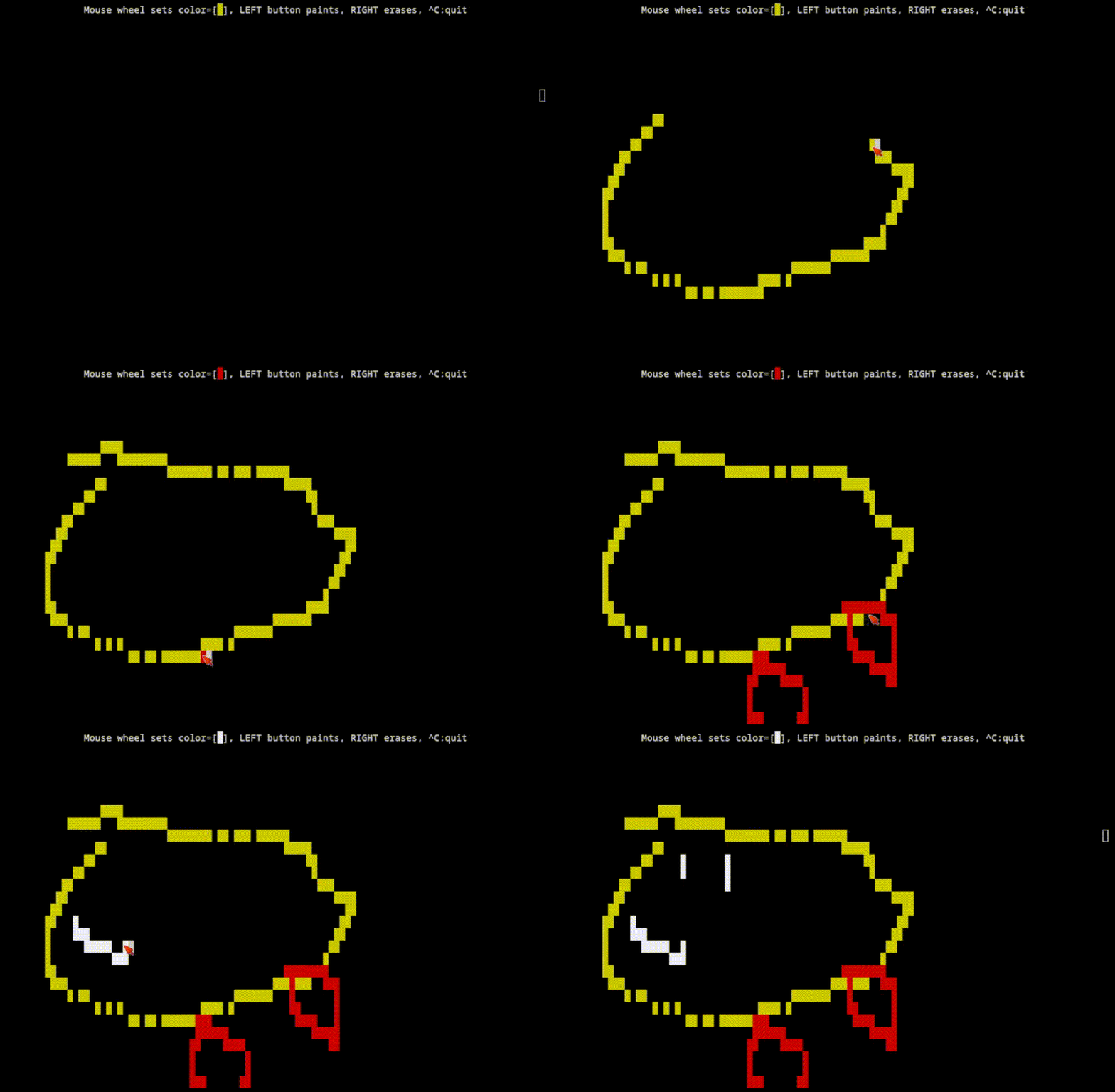
Painting is done while the left mouse button is held down, tracking both
MOUSE_LEFT and MOUSE_LEFT_MOTION, erased with MOUSE_RIGHT, and color
selection changed by MOUSE_SCROLL_UP and MOUSE_SCROLL_DOWN.
Note
When using report_motion=True, process events quickly! Mouse movement
generates many events that can fill the input buffer if not consumed promptly.
report_pixels
By default, mouse positions are reported in character cell coordinates - each position corresponds to a single character in the terminal grid.
For higher precision, use report_pixels=True to get pixel coordinates instead.
This is especially useful when combined with graphics protocols like Sixel:
 1#!/usr/bin/env python3
 2from blessed import Terminal
 3
 4term = Terminal()
 5
 6if not term.does_mouse(report_pixels=True):
 7    print("This terminal does not support pixel coordinate mouse tracking!")
 8else:
 9    print("Click to display Pixel coordinates, ^C to quit:")
10    with term.cbreak(), term.mouse_enabled(report_pixels=True):
11        while True:
12            event = term.inkey()
13
14            if event.name and event.name.startswith('MOUSE_'):
15                print(f"Pixel position: (y={event.y}, x={event.x})")
When using pixel mode, mouse events still use the same name
pattern (e.g., 'MOUSE_LEFT') and magic method predicates (e.g.,
inp.is_mouse_left()). The x and y
properties represent pixels instead of character cells.